WordPress video security
How to Protect WordPress Videos From Downloading: Signed URLs, HLS, and DRM
Protect paid WordPress course and membership videos with private delivery, expiring playback access, and DRM where it is justified.
If you sell a course or membership, the video is part of the product. A members-only lesson page does not necessarily protect the MP4, playlist, or video segments the player loads. If any of those resources has a permanent public URL, anyone who gets it may be able to use it.
To protect WordPress videos from downloading, authorize the viewer server-side, issue playback access only after that check, protect every request that can deliver usable media, and remove old public copies. Use digital rights management (DRM) when ordinary file downloading or reuse would create a material business or licensing problem.
No browser-based video can be made impossible to copy. The realistic goal is to stop easy downloads and casual link sharing while keeping playback reliable for paying customers.
The practical implementation sequence
For a paid course or membership video, configure the flow in this order:
- Keep the source asset out of a permanent public Media Library URL. Use private storage or a video-delivery service that can enforce access rules.
- Check entitlement server-side. When someone opens a lesson or starts playback, verify their membership, LMS enrollment, purchase, or subscription in WordPress.
- Issue playback authorization only after that check. Create a short-lived playback session or signed authorization for that customer and video.
- Protect every resource that enables usable playback. Depending on the setup, that means protecting the manifest or playlist, unencrypted segments, encryption keys, direct-file URLs, and DRM license requests. Encrypted segments may be publicly fetchable in some designs; without the protected key or license, they should be unusable.
- Remove or restrict old public copies. Moving the new playback source does not revoke a Media Library URL that was already public.
- Test with real account states. Check logged-out, unauthorized, expired, and copied-link scenarios before launch.
For many course and membership libraries, those controls reduce casual sharing without DRM. DRM is an extra playback layer for higher-value or more sensitive catalogues; it does not replace entitlement checks or private delivery.
A provider-agnostic WordPress playback example
The exact APIs differ by provider, but the control flow should look like this:
- The player asks a server-side WordPress endpoint for access to one video. The endpoint checks the logged-in account’s entitlement, such as a purchase, active subscription, membership, or LMS enrollment.
- If the check passes, your server asks the video provider or delivery layer for a short-lived playback session or token tied to that video and, where supported, the viewer or session. It returns only the data the player needs to start playback.
- The provider or CDN validates that authorization on the relevant playback flow. It may authorize a manifest, a direct file, a key, or a DRM license according to the provider’s design. Encrypted segments can be publicly fetchable when they are useless without the separately protected key or license; unencrypted usable media cannot be left public.
- The player uses the temporary authorization to request the manifest and playback resources. When DRM is present, it also requests a license through the provider’s protected license flow.
- When the token expires or the entitlement is revoked, new playback requests should fail according to the provider’s documented behavior.
This is an architecture pattern, not a prescription for a particular plugin, code sample, or video provider. The important boundary is that WordPress makes the entitlement decision, while the provider or CDN enforces authorization for the media needed to play that specific video.
What WordPress video protection has to control
A protected WordPress playback flow has three distinct controls:
- Page and account access determines whether someone may open the lesson.
- Video delivery determines whether the player can retrieve usable media, and for how long.
- Playback protection can make ordinary extraction and reuse harder on supported browsers and devices.
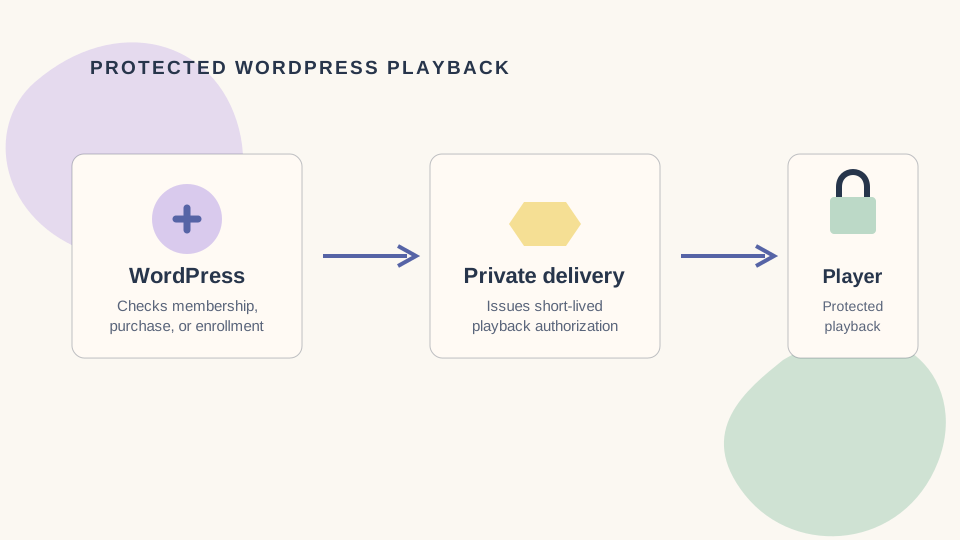
Figure 1: A product-agnostic protection flow. DRM encrypts media delivered to the client and authorizes its use; it does not make the media absent from the browser.
A typical request flow looks like this:
- A customer signs in and opens a lesson. WordPress checks their purchase, subscription, membership, or LMS enrollment.
- The lesson requests playback access for one specific video only after that check succeeds.
- The delivery service returns a short-lived playback session or authorization. It should not be a permanent, reusable link.
- The player requests the manifest or playlist, then the video segments and, where used, an encryption key. An unencrypted segment or direct file must not be publicly usable. An encrypted segment can be publicly fetchable in some HLS or DASH designs, provided the key or license needed to decrypt it remains protected.
- With DRM, the player also makes a license request. A supported browser or device uses that license to play the encrypted media.
The decisive question is not whether every request has its own access check. It is whether an unauthorized client can assemble a usable manifest, obtain playable unencrypted media, access the required key or DRM license, or retrieve a direct file.
Why a members-only page is not enough
WordPress page protection answers who may open the page. It does not automatically protect the requests the player makes for video.
Imagine restricting /courses/photography/lesson-4/ to paying members and adding an MP4 from the Media Library. The page is gated, but the MP4 URL may still work for anyone who obtains it. Removing the player’s download button changes what a visitor sees; it does not change what their browser receives.
Private storage alone is not enough either. If a playlist or unencrypted CDN resource, video segment, encryption key, or direct file remains publicly usable, the media may still bypass the WordPress access decision. Public encrypted segments may be acceptable when they cannot be decrypted without a protected key or license. Changing a lesson template also does not make an old Media Library URL private.
What common WordPress video protection methods really do
Passwords, memberships, purchases, and LMS enrollment
These are access controls. They decide whether someone should enter a product, lesson, or account area, and WordPress is usually the right place to make that decision.
They do not automatically secure the player’s video requests. The authorization check must connect to video delivery.
Unlisted links
An unlisted video is difficult to discover through search or a public catalogue. It is not tied to a particular customer, however. Anyone who receives the link may be able to watch it.
Use unlisted delivery for low-risk material or review links, not as the main protection for a paid library.
Domain and embed restrictions
An approved-domain rule can stop a copied embed from working on another site. That helps with unauthorized embedding, but it does not identify the viewer or stop an authorized viewer from recording playback.
Signed and expiring URLs
A signed URL carries authorization data—usually a signature and expiry—that the delivery service validates before returning a file or playback resource. It is a substantial improvement over a permanent public URL and can reduce link sharing.
The limitation matters: a signed URL authorizes a request; it does not necessarily stop the response from being saved. If a valid request returns an ordinary MP4, a viewer may be able to keep that file during the access window. Signed URLs are useful for private delivery, but they are not DRM by themselves.
HLS and DASH
HLS and DASH are delivery formats. They split video into segments and can let the player change quality as the viewer’s connection changes. That improves playback, but segmentation is not security.
For either format, ask which resources let an unauthorized client play the video. A publicly reachable playlist with publicly reachable unencrypted segments is usable video. Encrypted segments are different: they may be publicly fetchable in some architectures yet remain unusable without the protected key or license. Apple’s HLS content-protection guidance describes encryption and key-delivery approaches; the implementation still needs to protect whatever key or license makes playback possible.
Encrypted HLS or DASH alone is not necessarily DRM. DRM also involves a license process and a supported playback environment. The W3C Encrypted Media Extensions specification describes the browser API for interacting with content-decryption systems; it does not replace your entitlement or delivery controls.
DRM-backed playback
DRM encrypts media and uses a license process, together with supported browser or device capabilities, to authorize playback. Compared with a public MP4 or expiring link alone, it can make straightforward downloading and use outside the intended player substantially harder.
DRM does not make the video disappear from the browser. Encrypted data still reaches the device, which decrypts enough to play after a valid license decision. Screen recording, an external camera, account sharing, and recordings made during playback remain possible.
Before requiring DRM, confirm the browsers and devices your customers use. Plan for video packaging, license failures, unsupported devices, monitoring, and support—not just initial setup.
Signed URLs vs. DRM: choose by the risk
| Main concern | Useful layer | What it does not solve |
|---|---|---|
| Someone opens a paid lesson without buying it | WordPress permission check | A public or reusable file URL |
| A customer forwards a working video link | Signed or expiring delivery | Copying video during the valid window |
| Someone embeds the video on another site | Domain or embed restrictions | Viewer identity or screen recording |
| An ordinary file is downloaded and reused | DRM-backed playback on supported devices | Every form of copying or every device |
A premium course may use several layers. WordPress decides whether the account has permission to watch; the delivery service grants temporary access; DRM is a further choice when the catalogue’s value or sensitivity justifies its cost and compatibility burden.
Questions to ask a WordPress video provider
Ask for clear answers before committing to a plugin, host, or video platform:
- Can it check my actual WordPress setup? Confirm compatibility with your membership plugin, learning management system (LMS), ecommerce system, subscriptions, and login flow.
- What exactly is protected? Ask which resources must be authorized for usable playback: the manifest or playlist, unencrypted segments, encryption keys, direct-file URLs, and, if DRM is used, license requests—not only the storage bucket. Encrypted segments may be publicly fetchable in some designs if the required key or license remains protected.
- How long does playback permission last? Ask how tokens expire, whether they are tied to a video or session, and what happens when a token is copied.
- Which browsers and devices work? Request a current support list for phones, tablets, desktops, TVs, and managed devices. Ask what fallback appears when DRM is unavailable.
- What happens when access is revoked? Removing a membership may block new sessions without instantly stopping an active session. Cached licenses and offline playback may continue, depending on the provider and policy. Ask for the actual behavior.
- Who supports failures? Establish whether your team, the WordPress plugin author, or the video provider handles playback errors, license failures, integration bugs, and browser changes.
If “protected” only means that the original file is stored privately, the implementation may still leave a usable playback resource public.
A practical protection plan for different kinds of video
| Content | Starting controls | Reconsider when… |
|---|---|---|
| Public marketing video | Reliable adaptive streaming and approved embeds where useful | Licensing terms or distribution goals change |
| Low-risk paid or internal video | WordPress permission checks, private delivery, signed requests, and domain controls where useful | Link sharing becomes frequent or the library grows |
| Valuable course or membership library | WordPress permission checks, private adaptive streaming, and short-lived playback access; evaluate DRM against your device list | A leak would have a material revenue or licensing impact |
| Highly sensitive or licensed catalogue | The above plus DRM, monitoring, fallback rules, and a support plan | A new device, player, or rights requirement is introduced |
For a typical paid course, start with WordPress entitlement checks, private delivery, and expiring playback access. Evaluate DRM when a downloadable file would materially affect revenue or create a contractual rights problem.
Test the customer journey before launch
A focused customer-journey test catches many common exposure mistakes. Use request-level checks or a developer review for deeper assurance, especially after changing a membership plugin, LMS, player, storage configuration, or video provider.
- Logged out: Visit the lesson and confirm that no video plays.
- Wrong account: Use an account without the purchase, enrollment, or membership and confirm that playback is denied.
- Expired or cancelled access: Use an account whose membership has expired or been cancelled. Check a new visit and, if relevant, an already-open session.
- Copied link: Copy the player or video link and try it in another browser or account. A valid short-lived link may work until it expires; it should not remain a permanent way into the video.
- Old Media Library URL: Test a previous upload address in an unauthenticated session. If it still plays publicly, remove, restrict, or replace that source as appropriate, clear relevant caches, and test again.
- Supported devices: Have an entitled customer test the browsers and devices you advertise, including the fallback message for unsupported playback.
A developer or provider can then inspect manifest, segment, key, and license requests; confirm token expiry; verify that unauthorized requests cannot retrieve usable media; and test revocation behavior.
These tests cannot prove copying is impossible. They can expose a private-looking lesson backed by a publicly usable file, a token that never expires, an accessible decryption key or license, unencrypted video segments, or DRM that works only on one test device.
Common questions about WordPress video protection
How can I prevent video downloads in WordPress?
Start with a server-side permission check. Keep valuable media away from permanent public URLs, issue short-lived playback authorization, and protect every resource needed to play the video. Use domain controls where they help. If ordinary downloading remains a meaningful business risk, evaluate DRM against your customers’ browsers and devices. Removing the player’s download button is not enough.
How do I protect WordPress Media Library video URLs?
Do not use a permanent public Media Library URL as the playback source for valuable video. Move the asset to private, controlled delivery; have WordPress authorize the customer; and issue temporary playback access. For an old public source, remove, restrict, or replace it as appropriate, clear relevant caches, and retest the old URL while logged out.
Are signed URLs enough to protect WordPress videos?
They can be enough to reduce casual link sharing when they are short-lived and the resources needed for usable playback are controlled. They do not stop a viewer from saving an ordinary file returned during the valid window, and they are not equivalent to DRM. If a manifest is signed but unencrypted segments, keys, or direct files remain publicly usable, the setup is incomplete. Public encrypted segments may be compatible with a protected design when the required key or license is not publicly usable.
Is HLS the same as DRM?
No. HLS is a delivery format. It can be used in a DRM-backed design, but HLS by itself does not prove that the manifest, unencrypted segments, encryption keys, and license requests are protected. Encrypted segments may be publicly fetchable and still unusable without a protected key or license. The same principle applies to DASH.
Does DRM stop screen recording?
No. DRM protects encrypted media and authorized playback on supported environments. Screen recording, an external camera, account sharing, and recordings made during playback remain risks.
What does secure video hosting for WordPress need to include?
Look for integration with your WordPress access system, protection for every usable playback request, short-lived access, adaptive playback, a clear device-support matrix, and a plan for failures and support. Add DRM when the catalogue’s value or sensitivity justifies its cost and compatibility burden.
Choose protection that matches the video’s value
For most paid WordPress courses, the minimum effective stack is an entitlement check, private delivery, short-lived playback access, and testing of every account state. That will not stop every form of copying, but it closes the common gap between a protected lesson page and a publicly usable video URL.
EncodeHive is pre-launch and is validating a WordPress-first approach to DRM-backed streaming for businesses that sell access to video. Join the early-access list for product updates and the opportunity to share requirements that can inform product research. The product is not launched, and joining the list does not guarantee access.
Early access
Premium video should stay premium.
Help shape a WordPress-first approach to protected streaming for courses, memberships, and premium video libraries.
Join the early-access list